
 By
By 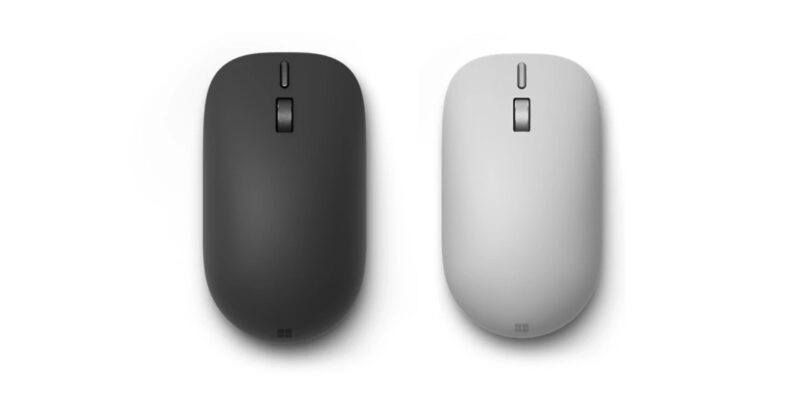
Key Highlights
- Microsoft Surface Mouse (2nd Edition) launched with advanced haptic feedback
- Customizable action button provides one-press access to Copilot and other shortcuts
- Bluetooth 6.0 supports switching between up to three devices
- Ambidextrous design with a soft-touch silicone top cover
- Uses two AAA batteries with up to six months of claimed battery life
Microsoft has introduced the Surface Mouse (2nd Edition) alongside its latest Surface Pro and Surface Laptop computers. The new wireless mouse focuses on a feature that is still relatively uncommon in mainstream PC accessories: haptic feedback that lets users physically feel certain actions taking place on screen.
The redesigned mouse also adds a customizable action button for Copilot and other shortcuts, Bluetooth 6.0 connectivity and support for switching between up to three devices. Microsoft has designed it for both left- and right-handed users, while the compact body is intended for everyday desk use and travel.
The main idea behind the new Surface Mouse is therefore not simply wireless pointing. Microsoft is trying to make common Windows interactions more tactile while keeping the mouse compatible with multiple devices.
| Feature | Details |
|---|---|
| Brand | Microsoft |
| Model | Surface Mouse (2nd Edition) |
| Launch Date | September 23, 2026 |
| Release Date | October 13, 2026 |
| Connectivity | Bluetooth 6.0 |
| Multi-device Support | Up to 3 devices |
| Design | Ambidextrous |
| Buttons | 4, including customizable action button |
| Haptic Feedback | Yes |
| Scroll Wheel | Mechanical |
| Compatibility | Windows 11 and compatible operating systems |
| Advanced Haptics | Windows 11 with supported apps |
| Battery | 2 × AAA alkaline batteries |
| Claimed Battery Life | Up to 6 months |
| Dimensions | 112.5 × 63.2 × 36.4mm |
| Weight | 115g including batteries |
| Colours | Black, Platinum |
| Material | Silicone top enclosure |
| Recycled Content | 30.8% |
| Price | $79.99 |
| Availability | Select markets |
Design & Build
The Surface Mouse (2nd Edition) gets a redesigned ambidextrous shape, allowing it to be used by both left- and right-handed users.
It measures 112.5 × 63.2 × 36.4mm and weighs approximately 115g with the batteries installed. Microsoft has added a silicone top enclosure designed to provide a non-slip surface and more consistent grip during extended use.
The mouse is available in Black and Platinum.
Microsoft is also highlighting its use of recycled materials. The current product specification lists 30.8% recycled content, including post-consumer recycled plastics in several components.
Haptic Feedback
Haptic feedback is the feature that separates the new Surface Mouse from a conventional wireless mouse.
Instead of relying only on physical clicks, the mouse can provide tactile responses for supported Windows interactions. Microsoft gives examples including clicking, snapping windows, resizing, dragging and dropping, and working with objects in applications such as PowerPoint.
The practical benefit is confirmation without requiring the user to look away from the screen. For example, when an object is aligned or a window snaps into position, the mouse can provide a small physical response.
Microsoft also allows users to adjust haptic intensity, so the feedback can be made more subtle or stronger depending on preference.
However, advanced haptic functionality requires Windows 11 and supported applications. Basic mouse functionality remains available on compatible operating systems, meaning the haptics are an additional Windows-focused feature rather than a universal Bluetooth function.
Customizable Action Button
The mouse includes a dedicated customizable action button in addition to the standard left, right and middle controls.
Microsoft configures the button for quick access to Copilot or Copilot Voice, but users can assign other shortcuts through the Surface app on Windows.
That makes the button potentially useful beyond Microsoft’s AI features. Users can configure it around frequently used applications or actions, although customization depends on Windows and the Surface app.
Connectivity & Multi-Device Support
The Surface Mouse uses Bluetooth 6.0 and can connect to and switch between up to three devices.
This is particularly useful for people who regularly move between a work laptop, personal computer and another compatible device. Microsoft’s Swift Pair support is also designed to simplify pairing on Windows.
The mouse does not require a dedicated USB receiver, which keeps the accessory simple for laptops with limited USB ports.
Battery Life
The Surface Mouse (2nd Edition) runs on two AAA alkaline batteries, which are included in the box.
Microsoft rates the mouse for up to six months of battery life. Actual endurance will depend on usage and other factors, so the figure should be treated as a manufacturer claim rather than an independently measured result.
Using replaceable batteries also means users can quickly restore the mouse when its batteries run down instead of waiting for an internal battery to recharge.
Price & Availability
The Microsoft Surface Mouse (2nd Edition) is priced at $79.99 in the US.
Microsoft lists October 13, 2026 as the release date, with Black and Platinum colour options. Availability is initially limited to select markets.
- Surface Mouse (2nd Edition) – $79.99 (Approx. Rs.7,700)
- Colours :- Black, Platinum
Microsoft has not announced India pricing or an India launch date in the information currently available, so an Indian price should not be inferred by simply converting the US price.
Competition & Alternatives
The Surface Mouse competes with conventional Bluetooth productivity mice from Microsoft, Logitech and other accessory makers.
| Alternative Type | Why Consider It? | Surface Mouse Difference |
|---|---|---|
| Conventional Bluetooth mouse | Often cheaper and simpler | Haptic feedback and Windows-focused controls |
| Multi-device productivity mouse | Designed for switching between computers | Surface Mouse supports up to three devices |
| Premium ergonomic mouse | More specialised for long working sessions | Surface Mouse focuses on compact design and haptics |
The biggest reason to choose the Surface Mouse is therefore not basic pointing functionality. Its main differentiators are Windows haptics, the customizable action button and three-device switching.
Final Verdict: Should You Buy It?
The Surface Mouse (2nd Edition) is aimed at users who spend significant time working on Windows and want more tactile feedback from everyday interactions. Its haptic system is the defining feature, while the customizable action button and three-device switching make it more useful as a productivity accessory.
The $79.99 price is harder to justify if you simply need a basic Bluetooth mouse. Many conventional models can handle pointing, scrolling and multi-device connectivity without the additional Windows-focused features.
Best for: Windows users, Surface owners, productivity-focused users and people who frequently switch between multiple PCs.
Consider alternatives if: You want USB-C charging, advanced ergonomic features, gaming-focused performance or simply a lower-cost wireless mouse.
Bottom line: The Surface Mouse (2nd Edition) is less about reinventing the basic mouse and more about adding tactile feedback and Windows-specific controls to familiar wireless functionality. Its value will depend largely on whether those haptic and shortcut features fit into your daily workflow.

Comments