
 By
By 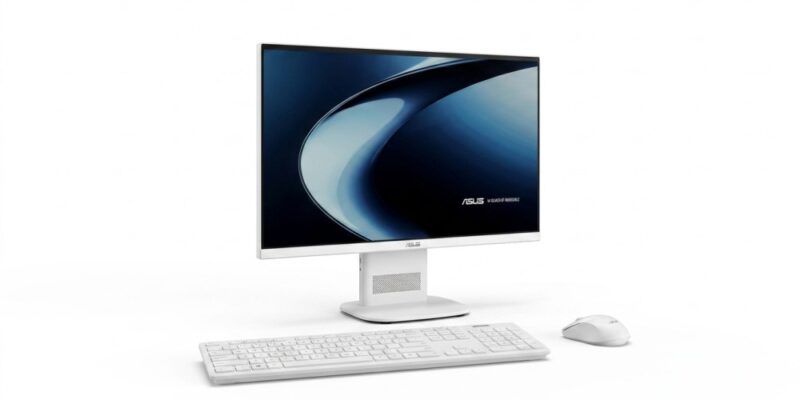
Key Highlights
- 24-inch Full HD display with 100% sRGB coverage
- Up to AMD Ryzen 5 processor
- Up to 8GB LPDDR5X RAM and 512GB PCIe Gen 4 SSD in the India launch configuration
- 1080p webcam with physical privacy shutter and AI noise cancellation
- New accessories include Jelly75 keyboard, MD105 mouse, CW200 combo and ROG HDMI Cable LHR60
ASUS has expanded its desktop lineup in India with the launch of the VM240 AiO, a 24-inch all-in-one desktop aimed at everyday computing, work, learning and entertainment. The company has also introduced four accessories alongside it, covering mechanical-style keyboards, wireless mice, a keyboard-and-mouse combo and a high-bandwidth HDMI cable.
The VM240 AiO combines the computer hardware, display, webcam and speakers into a single setup. That makes it particularly interesting for users who want a cleaner desk without buying a separate desktop tower, monitor, webcam and speakers.
Priced at Rs. 66,990, the VM240 sits above entry-level desktop territory in India. The bigger question, therefore, is whether its all-in-one convenience makes more sense than buying a conventional desktop or laptop at a similar price.
Why the ASUS VM240 AiO Is Getting Attention
The VM240 is not trying to compete with high-end gaming desktops or upgradeable enthusiast PCs.
Its main selling point is simplicity.
The all-in-one design puts the computer behind the display, while the integrated webcam and speakers mean fewer components have to occupy the desk. The 22mm stand and adjustable tilt further reinforce that space-saving approach.
For students, home-office users and families, this can be genuinely useful. There is less cable management and no need to separately choose a monitor, webcam and speakers.
The trade-off is equally important: an AiO generally gives buyers less flexibility than a conventional desktop. So the VM240 makes the most sense for someone who values a tidy, ready-to-use setup rather than maximum upgradeability.
| Feature | Details |
|---|---|
| Model | ASUS VM240 AiO |
| Display | 23.8-inch Full HD LCD |
| Resolution | 1920 × 1080 pixels |
| Refresh rate | 60Hz |
| Brightness | 300 nits |
| Colour coverage | 100% sRGB |
| Processor | Up to AMD Ryzen 5 |
| RAM | Up to 8GB LPDDR5X in India launch configuration |
| Storage | Up to 512GB PCIe Gen 4 SSD |
| Webcam | 1080p with privacy shutter |
| Audio | Dual 2W front-facing speakers, Dirac |
| Connectivity | Wi-Fi 6E, HDMI, RJ-45, USB Type-A |
| Operating system | Windows 11 Home |
| Stand | 22mm, adjustable tilt |
| Price | Rs. 66,990 |
Design & Build
The ASUS VM240 follows the typical all-in-one desktop philosophy: the display and PC hardware are integrated into one unit instead of being separated into a monitor and tower.
Its 22mm stand helps keep the footprint relatively compact, while adjustable tilt lets users change the viewing angle. ASUS is positioning the system around a cleaner workspace, which should appeal to people setting up a home office, study area or shared family computer.
Unlike a traditional desktop tower, there is no large CPU cabinet sitting beside or underneath the desk. That is one of the VM240’s strongest practical advantages.
However, buyers should also remember that the compact design comes with a compromise in flexibility. Those who regularly upgrade components or build their own PCs will generally have more freedom with a conventional desktop.
Display
The VM240 features a 23.8-inch Full HD display with a 1920×1080 resolution, 16:9 aspect ratio, 60Hz refresh rate and 300-nit brightness. The panel also covers 100% of the sRGB colour gamut.
For office work, browsing, online classes and streaming, this combination should be adequate. The 24-inch class screen also provides considerably more working space than a laptop display without becoming too large for a typical desk.
The 100% sRGB coverage is a nice addition for everyday photo and content work, although this should not automatically be treated as a professional colour-accurate monitor without independent testing.
At 60Hz, the VM240 is clearly designed more around productivity and general computing than high-refresh-rate gaming.
Performance
The VM240 can be configured with up to an AMD Ryzen 5 processor, alongside up to 8GB LPDDR5X memory in the India launch configuration and up to 512GB PCIe Gen 4 SSD storage.
For everyday users, this hardware should be suitable for web browsing, Microsoft Office-style productivity, video calls, online learning, media consumption and general multitasking.
The PCIe Gen 4 SSD is particularly useful for keeping application launches and file access responsive.
However, this isn’t a machine that should be bought specifically for demanding gaming, professional 3D work or heavy video production. The integrated all-in-one design and stated configuration are much better aligned with mainstream computing.
And because ASUS has not positioned the VM240 as a gaming desktop, buyers looking for dedicated graphics performance should consider a conventional PC instead.
Webcam, Audio and AI Features
The VM240 includes a 1080p webcam with a physical privacy shutter, which is particularly useful for people who regularly attend online meetings or classes. The physical shutter gives users a simple way to block the camera when it is not being used.
Audio comes from dual front-facing 2W speakers with Dirac audio. ASUS has also included AI-powered noise cancellation to reduce unwanted background sounds during calls.
For a home-office computer, these built-in features matter because buyers do not necessarily need to add a separate webcam and speaker system.
Connectivity
Connectivity includes Wi-Fi 6E, HDMI, RJ-45 Ethernet and multiple USB Type-A ports. This provides both wireless and wired options for networking and peripherals.
For everyday desktop use, the combination should cover common requirements such as wired internet, external storage, keyboards, mice and additional peripherals.
The presence of HDMI is also useful for users who may want to connect the system to another compatible display.
ASUS Jelly75 Keyboard KD201
Alongside the VM240, ASUS launched the Jelly75 Keyboard KD201 at Rs. 8,999.
This is arguably the most enthusiast-oriented accessory in the new lineup. It features hot-swappable keys, allowing users to change compatible switches without replacing the entire keyboard.
It supports Bluetooth, 2.4GHz wireless and wired USB Type-C connectivity, and can be paired with up to five devices.
The keyboard is available in Orange Meadow and Volt Green, with contrasting Spacebar and Esc keys.
For users who care about typing feel and keyboard customisation, the hot-swappable design is more meaningful than simply having another wireless keyboard.
The Jelly75 will be available in India from August 31.
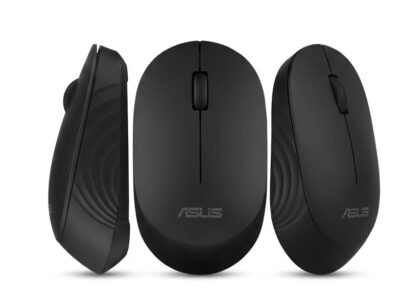
ASUS Wireless Mouse MD105
The ASUS Wireless Mouse MD105 is priced at Rs. 1,799.
It supports 2.4GHz RF and Bluetooth 5.0 connectivity, with the ability to switch between up to three devices. Users can select between 1,200, 1,600 and 2,400 DPI settings.
The mouse is offered in Milky White and Volt Green and uses an ergonomic design with quieter clicks.
This is primarily an everyday productivity accessory rather than a gaming-focused mouse.
ASUS Marshmallow Keyboard and Mouse Combo CW200
The ASUS Marshmallow Keyboard and Mouse Combo CW200 costs Rs. 4,199.
It can connect to up to three devices and supports multiple operating systems. ASUS has also included a dedicated Copilot key, while the mouse offers adjustable DPI settings.
The combo comes in Oat Milk and Quiet Blue colour options.
For people who regularly switch between computers or workspaces, the multi-device functionality could be more useful than buying separate basic peripherals.
ROG HDMI Cable LHR60
The ROG HDMI Cable LHR60 is the most affordable product in the launch at Rs. 999.
It provides 48Gbps bandwidth, supporting up to 8K at 60Hz and 4K at 144Hz on compatible hardware. It also supports HDMI Variable Refresh Rate, which can help reduce screen tearing and stuttering.
The 1.8-metre cable uses a nylon-braided sleeve and gold-plated connectors.
This accessory is therefore more relevant to gamers and users with high-resolution or high-refresh-rate displays than someone buying the VM240 purely for office work.
ASUS VM240 AiO Price and Availability in India
The complete launch pricing is as follows:
| Product | India Price | Availability |
|---|---|---|
| ASUS VM240 AiO | Rs. 66,990 | August 20 |
| ASUS Jelly75 Keyboard KD201 | Rs. 8,999 | August 31 |
| ASUS Wireless Mouse MD105 | Rs. 1,799 | August 20 |
| ASUS Marshmallow Combo CW200 | Rs. 4,199 | August 20 |
| ROG HDMI Cable LHR60 | Rs. 999 | August 20 |
The VM240 is available through ASUS Exclusive Stores, ASUS Eshop, Flipkart and Amazon. The new accessories are being sold through ASUS channels, ROG Stores and authorised retailers, depending on the product.
The Ryzen 5 VM240 configuration is expected to become available from mid-September, according to ASUS’s launch information.
Because these are official India prices, no currency conversion is required.
Competition & Alternatives
The VM240’s most obvious competition isn’t necessarily another AiO.
At Rs. 66,990, buyers can also consider a laptop, particularly if portability is important, or a conventional desktop with a separate monitor if upgradeability and performance matter more.
| Alternative | Why consider it? | Why choose the VM240 instead? |
|---|---|---|
| Conventional desktop | Better upgradeability and component flexibility | Cleaner, simpler all-in-one setup |
| Laptop | Portable and includes its own display | Larger 24-inch desktop workspace |
| Budget desktop + monitor | Potentially better performance flexibility | Integrated webcam, speakers and PC |
| Another AiO | Similar space-saving experience | ASUS ecosystem and included features |
The VM240 therefore makes the most sense for buyers who want a ready-to-use desktop setup rather than a highly upgradeable PC.
Is the ASUS VM240 AiO Worth Its Price?
At Rs. 66,990, the VM240 needs to justify more than just its processor and storage.
Its biggest value proposition is the complete package. The 24-inch display, PC hardware, webcam, speakers and compact stand are integrated into one system. For a home office, student desk or family computer, that convenience can be worth paying for.
But buyers focused on raw performance should compare carefully. A conventional desktop can offer greater upgrade flexibility, while a laptop adds portability.
The VM240 is therefore best viewed as a convenience-focused desktop, rather than a performance-per-rupee champion.
The accessories are easier to evaluate individually. The Jelly75 is aimed at keyboard enthusiasts, the MD105 at everyday productivity, the CW200 at multi-device users and the ROG HDMI Cable at high-refresh-rate display users.
Pros & Cons
Pros
- Space-saving all-in-one design
- 24-inch Full HD display
- 100% sRGB coverage
- Up to AMD Ryzen 5
- 1080p webcam with physical privacy shutter
- AI noise cancellation for calls
- Dirac-enhanced speakers
- Wi-Fi 6E
- Multiple new accessories for different use cases
Cons
- Limited upgrade flexibility compared with conventional desktops
- 8GB maximum RAM in the reported India configuration
- 60Hz display is not aimed at high-refresh-rate gaming
- Ryzen 5 configuration arrives later
- Rs. 66,990 puts it against flexible laptop and desktop options
Who Should Buy the ASUS VM240 AiO?
Best For
- Home-office users
- Students
- Online learning
- Family computing
- Everyday productivity
- Users with limited desk space
- Buyers who want an integrated desktop setup
Consider Alternatives If
- You want serious gaming performance
- You need extensive hardware upgrades
- You run demanding professional applications
- You want maximum performance per rupee
- You need a portable computer
Final Verdict
The ASUS VM240 AiO is designed around a simple idea: make desktop computing easier to set up and easier to live with.
Its 24-inch display, integrated 1080p webcam, speakers, Wi-Fi 6E and compact all-in-one design make it a sensible option for everyday work, learning and home use. The Ryzen 5 configuration should provide enough performance for mainstream workloads, although buyers with demanding requirements should look beyond an AiO.
At Rs. 66,990, the VM240 isn’t automatically the best-value desktop for every buyer. Its real advantage is the combination of convenience, integrated hardware and a cleaner workspace.
The four new accessories broaden ASUS’s offering further. The Jelly75 targets enthusiasts, the MD105 and CW200 focus on productivity, while the ROG HDMI Cable LHR60 is aimed at users with high-resolution and high-refresh-rate displays.
For buyers who value simplicity over upgradeability, the VM240 deserves consideration. For performance-focused users, a conventional desktop remains the more flexible route.
FAQ
What is the ASUS VM240 AiO price in India?
The ASUS VM240 AiO is priced at Rs. 66,990 in India.
What processor does the ASUS VM240 AiO use?
The VM240 can be configured with up to an AMD Ryzen 5 processor.
How much storage does the ASUS VM240 offer?
The AiO supports up to 512GB PCIe Gen 4 SSD storage.
Does the ASUS VM240 have a webcam?
Yes. It has a 1080p webcam with a physical privacy shutter.
What accessories were launched with the ASUS VM240?
ASUS launched the Jelly75 Keyboard KD201, Wireless Mouse MD105, Marshmallow Keyboard and Mouse Combo CW200 and ROG HDMI Cable LHR60.
What is the cheapest ASUS accessory launched alongside the VM240?
The ROG HDMI Cable LHR60 is the cheapest at Rs. 999.




Comments