
 By
Key Highlights
- Logitech MX Master 4 Creator Edition launched in India on November 21, 2026.
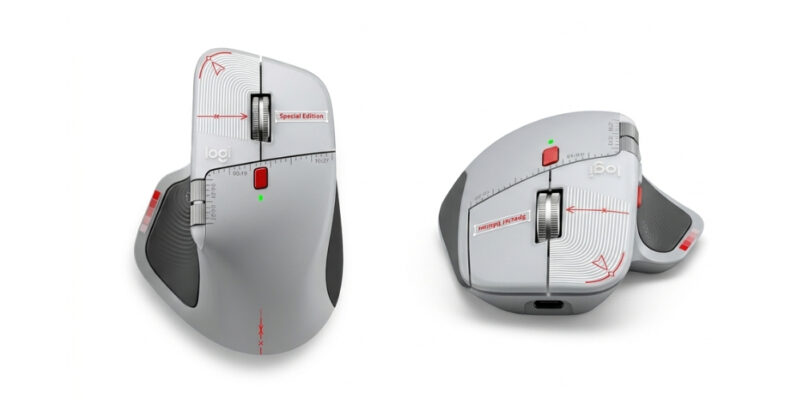
- Features a creator-inspired design with alignment crosshairs, layout grids and colour calibration graphics.
- Retains the 8,000 DPI Darkfield sensor and MagSpeed electromagnetic scroll wheel.
- Includes customisable haptic feedback and Actions Ring shortcuts.
- Offers a 650mAh rechargeable battery rated for up to 70 days of use.
Logitech has introduced the MX Master 4 Creator Edition in India, adding another special-edition version to its flagship wireless productivity mouse lineup. Following the launch of the Developer Edition in October, the new version features a design inspired by creative studios, with graphics representing artboards, editing timelines and visual design tools.
The MX Master 4 Creator Edition retains the standard model’s hardware, including its 8,000 DPI Darkfield sensor, MagSpeed scroll wheel and customisable haptic feedback. It also includes the Actions Ring shortcut system, which allows users to access frequently used tools and commands without repeatedly navigating application menus.
Rather than introducing new hardware, Logitech is using the Creator Edition to give its existing productivity mouse a visual identity aimed at designers, photographers and video editors.
| Feature | Details |
|---|---|
| Product | Logitech MX Master 4 Creator Edition |
| Model Number | 910-008023 |
| Type | Wireless productivity mouse |
| Dimensions | 128.15 × 88.35 × 50.8mm |
| Weight | 150g |
| Sensor | Darkfield High Precision |
| DPI | 200–8,000 |
| Buttons | 8 |
| Scroll Wheel | MagSpeed with SmartShift |
| Haptic Feedback | Customisable |
| Actions Ring | Supported |
| Connectivity | Bluetooth Low Energy 5.1, Logi Bolt |
| Wireless Range | Up to 10 metres |
| Battery | Rechargeable 650mAh |
| Battery Life | Up to 70 days |
| Software | Logi Options+ |
| Warranty | 1-year limited hardware warranty |
| India Price | ₹20,699 (MRP) |
Design and Build
The main difference between the Creator Edition and the regular MX Master 4 is its exterior design. Logitech has given the mouse a light-coloured finish with graphite details and red accents, drawing inspiration from the markings commonly found on professional creative studio workspaces.
The body features alignment crosshairs, layout grids, Bézier curves and colour calibration bands. These graphics represent tools and visual references used in photography, graphic design and digital editing.
Logitech has also included keyframe timestamp references associated with World Creativity Day, World Design Day and World Photography Day.
Despite the different appearance, the mouse retains the familiar MX Master 4 shape. It measures 128.15 × 88.35 × 50.8mm and weighs 150g. The ergonomic design includes a dedicated thumb-rest area and multiple controls for navigating applications.
Haptic Feedback and Actions Ring
The MX Master 4 Creator Edition retains Logitech’s Haptic Sense Panel, which provides customisable tactile feedback for supported actions, shortcuts and notifications.
For creative workflows, this can provide additional feedback when adjusting sliders, snapping images to grids or navigating supported editing tools.
Logitech Options+ allows users to customise haptic responses for features such as Actions Ring, Smart Actions and Gestures. Supported third-party application plugins include Adobe Photoshop, Adobe Lightroom Desktop, Zoom and Adobe Premiere Pro.
The mouse also includes the Actions Ring shortcut system. It provides an on-screen interface containing frequently used tools and commands, allowing users to access selected functions directly from the cursor.
This can reduce repeated menu navigation when switching between editing tools, applying adjustments or performing common application-specific tasks. However, advanced customisation requires Logitech Options+ on compatible Windows and macOS systems.
Scroll Wheel and Tracking
The mouse features Logitech’s MagSpeed electromagnetic scroll wheel with SmartShift technology. It supports both precise scrolling and faster free-spinning navigation, depending on the task.
Logitech claims the wheel can scroll through up to 1,000 lines per second. This can be useful when navigating long documents, large spreadsheets and video editing timelines.
There is also a dedicated thumbwheel for horizontal scrolling, which can help when working with wide editing timelines or spreadsheets.
For tracking, the Creator Edition uses a Darkfield high-precision sensor with an adjustable sensitivity range of 200 to 8,000 DPI. Logitech says the sensor can track on glass surfaces with a minimum thickness of 4mm, making it suitable for different desktop setups.
Connectivity, Battery and Compatibility
The Logitech MX Master 4 Creator Edition supports Bluetooth Low Energy 5.1 and wireless connectivity through a Logi Bolt USB receiver. Its stated wireless range is up to 10 metres.
Users can connect the mouse to compatible devices and use Logitech’s Easy-Switch functionality to move between up to three paired devices.
The mouse includes a rechargeable 650mAh battery rated for up to 70 days of use on a full charge. Actual battery life will depend on usage and settings.
Bluetooth compatibility includes Windows 11 or later, macOS 13 or later, Linux, ChromeOS, iPadOS 15 or later and Android 12 or later. Logi Bolt receiver support also covers Windows 10 or later, macOS 13 or later, Linux and ChromeOS. Basic functions are available on supported platforms without Options+.
Materials and Sustainability
Logitech has also highlighted the materials used in the MX Master 4 Special Edition.
The aluminium used in its thumbwheel is manufactured using renewable energy rather than fossil fuels. Its rechargeable battery uses 100% recycled cobalt, measured through mass balance or direct measurement of segregated material flows.
The product’s paper packaging comes from FSC-certified forests and other controlled sources.
Price and Availability
The Logitech MX Master 4 Creator Edition carries an MRP of ₹20,699 in India. At launch, it was launch prices of around ₹12,995 on Amazon and Flipkart, although these prices may change depending on retailer offers and stock.
The Creator Edition is offered as a limited-edition product. Interested buyers can check the following retailers for availability:
The product has its own model number, 910-008023, distinguishing it from the Developer Edition, which carries model number 910-008022.
Creator Edition vs Developer Edition: What’s Different?
Logitech now offers two special-edition versions of the MX Master 4, each with a different design theme.
| Feature | Creator Edition | Developer Edition |
|---|---|---|
| Model Number | 910-008023 | 910-008022 |
| Design Theme | Creative studio and artboard | Programming and terminal |
| Main Graphics | Alignment grids, Bézier curves, calibration bands | Syntax prompts and circuit patterns |
| Accent Colour | Red | Green |
| Sensor | 8,000 DPI Darkfield | 8,000 DPI Darkfield |
| Haptic Feedback | Yes | Yes |
| Actions Ring | Yes | Yes |
| Battery | 650mAh | 650mAh |
| Battery Life | Up to 70 days | Up to 70 days |
The Creator Edition is aimed at designers, photographers and video editors, while the Developer Edition uses programming-inspired graphics aimed at developers and software enthusiasts.
Both retain the same core MX Master 4 hardware and productivity features. The differences are primarily cosmetic rather than performance-related.
Readers can also check our earlier coverage of the Logitech MX Master 4 Developer Edition for more details.
Final Verdict: Should You Buy It?
The Logitech MX Master 4 Creator Edition is primarily a design-focused special release rather than a hardware upgrade. It retains the productivity features of the standard MX Master 4 while introducing an exterior inspired by professional creative workflows.
Its haptic feedback, Actions Ring and MagSpeed wheel remain useful for people who regularly work with editing software, large documents and multiple applications. However, these features are not exclusive to the Creator Edition.
Best for: Designers, photographers, video editors and Logitech enthusiasts who appreciate its special-edition appearance.
Consider the standard MX Master 4 if: You want the same core productivity features without paying extra for the special design.
Bottom line: The Creator Edition gives Logitech’s flagship mouse a distinct visual identity, but buyers should choose it primarily for the design rather than expecting better performance than the regular MX Master 4.








Comments