
 By
Key Highlights
- 65% compact layout with dedicated navigation keys
- 26.8mm-thin design with aluminium top cover
- ASUS RX Red Low-Profile optical switches
- Bluetooth, 2.4GHz wireless and USB connectivity
- Supports pairing with up to five devices
- Integrated touch panel with customisable controls
- 4,000mAh battery with up to 16 months of claimed battery life
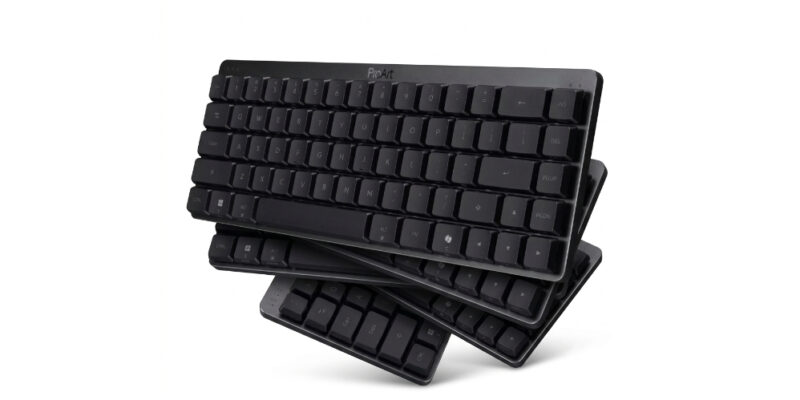
ASUS has introduced the ProArt Keyboard KD300 in India, expanding its creator-focused accessory portfolio with a compact wireless keyboard featuring low-profile optical switches, customisable touch controls and multi-device connectivity. The keyboard is designed for professionals who want to keep their workspace organised without giving up dedicated navigation keys and advanced customisation options.
The ASUS ProArt KD300 features a 65% layout, a 26.8mm-thin profile and an aluminium top cover. It supports Bluetooth, 2.4GHz wireless and USB connectivity, allowing users to pair it with up to five devices. Other highlights include ASUS RX Red Low-Profile optical switches, RGB backlighting, a 4,000mAh battery and the browser-based ASUS Gear Link interface.
The keyboard also includes a touch panel for controlling volume, media playback and lighting. Its PC/Mac toggle switch and magnetic receiver storage further distinguish it from conventional compact keyboards.
| Feature | Details |
|---|---|
| Brand | ASUS |
| Model | ProArt Keyboard KD300 |
| Launch market | India |
| Layout | 65% |
| Key style | Mechanical |
| Switches | ASUS Low-Profile Optical RX Red |
| Connectivity | Bluetooth, 2.4GHz RF, USB |
| Multi-device support | Up to 5 devices |
| Wireless range | Up to 10 metres |
| Polling rate | 1,000Hz USB and 2.4GHz; 133Hz Bluetooth |
| Backlighting | RGB |
| Battery | 4,000mAh Li-ion |
| Battery life | Up to 16 months (2.4GHz, backlighting off) |
| Software | ASUS Gear Link |
| Special features | Touch panel, PC/Mac switch, magnetic dongle storage |
| Dimensions | 305.6 × 109 × 26.8mm |
| Weight | 600.4g |
| Colour | Black Aerolite |
| OS support | Windows 11, macOS 15.0.1 or later |
| Price in India | ₹14,999 |
Design and Build
The ASUS ProArt KD300 uses a compact 65% layout that reduces the keyboard’s footprint while retaining arrow and navigation keys. Measuring 305.6 × 109 × 26.8mm, it is designed to occupy less desk space, leaving additional room for a mouse, drawing tablet or other creative equipment.
The keyboard features an aluminium top cover and weighs 600.4 grams. Its 26.8mm profile gives it a low-profile appearance, while two adjustable kickstand positions allow users to select between 4.5-degree and 8-degree typing angles.
The compact layout does involve some compromises. It does not offer a dedicated function row or numeric keypad, meaning users who frequently work with spreadsheets or function-key shortcuts may need time to adjust.
Connectivity and Touch Controls
One of the main attractions of the ProArt KD300 is its tri-mode connectivity. Users can connect through Bluetooth, a 2.4GHz wireless receiver or a USB connection.
The keyboard supports pairing with up to five devices, although only one device can be actively connected at a time. A dedicated PC/Mac switch makes it easier to adapt the keyboard layout when changing operating systems.
ASUS has also integrated a touch panel with a multifunction switch. It allows users to adjust volume, control media playback and manage keyboard lighting without relying entirely on conventional key combinations.
The magnetic dongle storage slot is another practical addition, helping users keep the wireless receiver attached to the keyboard when it is not in use.
Switches and Typing Features
The ProArt KD300 comes with ASUS RX Red Low-Profile optical switches. These switches use a linear mechanism and have a specified 1.0mm actuation point, with key feedback rated between 40 and 55 gram-force.
The optical switching mechanism is intended to deliver responsive input, while the low-profile construction keeps the overall keyboard height down.
ASUS has also included two layers of silicone sound-dampening foam to reduce unwanted keyboard noise and internal echoes. The gasket-mounted construction is another part of its typing design.
However, switch specifications alone cannot establish how comfortable the keyboard will feel during extended typing sessions. Buyers should consider the compact layout and linear switch characteristics alongside their typing preferences.
Software and Customisation
ASUS uses its browser-based Gear Link interface to provide additional customisation options without requiring a conventional desktop software installation.
Users can create profiles, remap keys, record macros and adjust lighting effects. The interface also provides shortcut options for supported Adobe applications through ten preset AI shortcut showcards.
The touch panel can also be customised for different actions, allowing users to configure shortcuts that better match their workflows.
These features make the KD300 more flexible than a basic compact wireless keyboard, particularly for users who frequently work with creative applications.
Battery and Charging
The ASUS ProArt KD300 houses a 4,000mAh lithium-ion battery. ASUS claims up to 16 months of battery life when using 2.4GHz wireless connectivity with the backlighting switched off.
With RGB lighting enabled at full brightness, the manufacturer’s claimed battery life drops to up to 100 days. Bluetooth mode is rated for up to nine months with lighting off or up to 86 days with full-brightness lighting.
These figures depend on connection mode and lighting settings, so actual battery life will vary with usage.
The keyboard charges through its included cable, with ASUS specifying a required charging power of 0.5W to 5W.
Price and Availability
The ASUS ProArt Keyboard KD300 has been launched in India at an official eStore-listed price of ₹14,999. ASUS lists its earlier price as ₹24,999, representing a displayed discount of ₹10,000.
The keyboard is offered in a single Black Aerolite colour option.
the keyboard was scheduled to become available from November 14 through ASUS Exclusive Stores, ROG Stores, Flipkart, Amazon and the ASUS eStore.
However, the ASUS online listing currently shows the product as out of stock. Buyers should check individual retailers for actual availability.
Competition and Alternatives
The ASUS ProArt KD300 competes with several premium compact and low-profile keyboards in India.
| Alternative | Why Consider It? | Why Choose ASUS Instead? |
|---|---|---|
| Logitech MX Mechanical Mini | Compact low-profile mechanical typing and multi-device support; around ₹9,495 in current listings | Optical switches, touch panel and RGB customisation |
| NuPhy Air75 V3 | Low-profile mechanical design with multiple switch options; listed around ₹13,899 on an Indian retailer | Dedicated touch controls and magnetic receiver storage |
| Keychron K2 V2 | More traditional wireless mechanical keyboard at a lower price | Slimmer 65% layout and creator-focused customisation |
The Logitech MX Mechanical Mini is worth considering for buyers who prioritise a compact typing-focused keyboard at a lower price. The NuPhy Air75 V3 offers another low-profile alternative, while Keychron’s K2 provides a more conventional mechanical keyboard experience.
Prices and availability may change between retailers. <a href=”https://www.keychron.in/collections/mini-keyboards”>Keychron India listings</a> and the other retailer listings should be checked before purchasing.
Final Verdict: Should You Buy the ASUS ProArt KD300?
The ASUS ProArt KD300 is aimed at creators and professionals who want a compact keyboard with more customisation options than a conventional wireless model.
Its touch panel, programmable macros, tri-mode connectivity and low-profile optical switches give it a distinct feature set. The ability to pair with five devices is also useful for people who regularly switch between computers and tablets.
However, the ₹14,999 price places it in the premium keyboard segment. Buyers who primarily need a reliable typing keyboard may find the Logitech MX Mechanical Mini or Keychron alternatives more economical.
Best for: Creators, multi-device users and people who prefer compact low-profile keyboards with customisable controls.
Consider alternatives if: You need a numeric keypad, a dedicated function row or a more affordable mechanical keyboard.
Bottom line: The ASUS ProArt KD300 stands out through its touch controls and software customisation rather than its compact layout alone. Its value depends on whether these additional features genuinely improve your daily workflow.










Comments