
 By
By 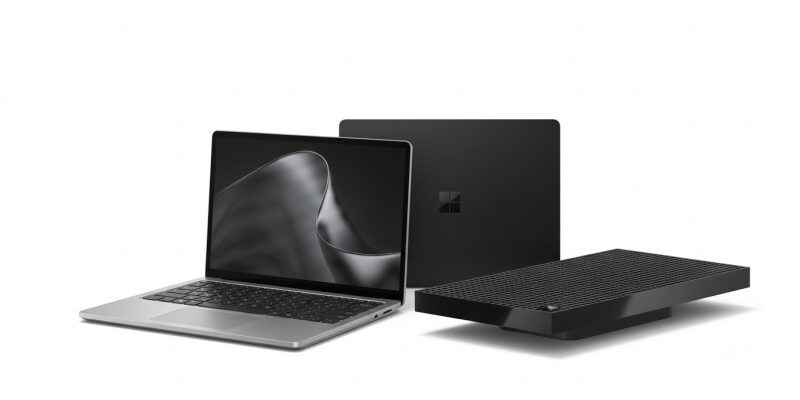
Key Highlights
- Surface Laptop Ultra features a 15-inch PixelSense Ultra touchscreen with a 3:2 aspect ratio and up to 120Hz refresh rate
- NVIDIA RTX Spark N1X offers up to a 20-core CPU and 6,144-core Blackwell GPU
- Surface Laptop Ultra supports up to 128GB of unified LPDDR5x memory
- Surface RTX Spark Dev Box comes with 128GB unified memory and a 2TB Gen 5 SSD
- Both devices are rated for up to one petaflop of theoretical AI performance
Microsoft has launched the Surface Laptop Ultra and Surface RTX Spark Dev Box, introducing two new Surface devices built around NVIDIA’s RTX Spark Superchip. The two products target different users but share the same focus on local AI, GPU-accelerated workloads and developer-focused computing.
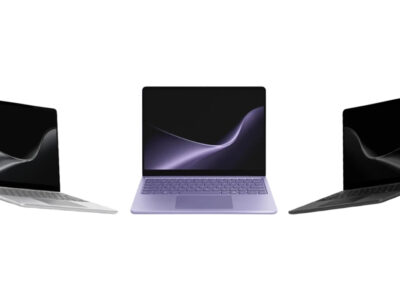
The Surface Laptop Ultra is Microsoft’s new high-performance 15-inch laptop for developers, creators and AI builders. It combines an NVIDIA Grace CPU with a Blackwell RTX GPU offering up to 6,144 GPU cores, along with up to 128GB of unified LPDDR5x memory. Microsoft says the system can deliver up to one petaflop of AI performance and run AI models exceeding 120 billion parameters locally.
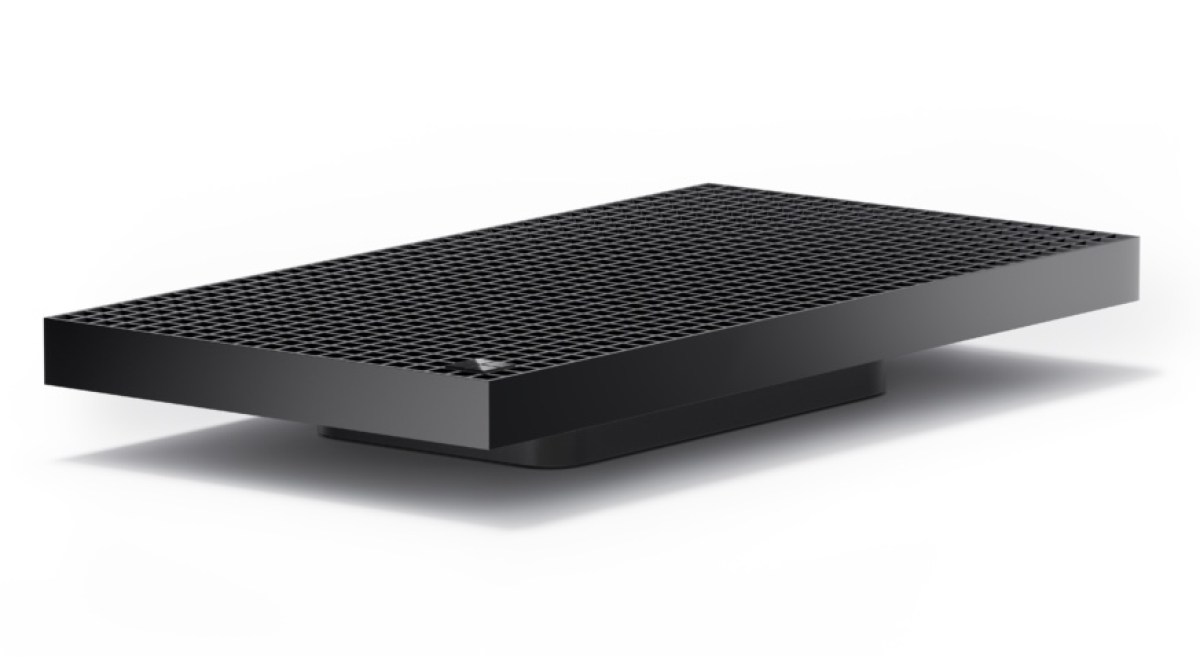
The Surface RTX Spark Dev Box takes the same RTX Spark platform into a compact desktop designed specifically for developers and AI engineers. It comes in a single configuration with a 20-core CPU, 6,144-core Blackwell GPU, 128GB unified memory and a 2TB Gen 5 SSD.
| Feature | Surface Laptop Ultra | Surface RTX Spark Dev Box |
|---|---|---|
| Brand | Microsoft | Microsoft |
| Model | Surface Laptop Ultra | Surface RTX Spark Dev Box |
| Processor | NVIDIA RTX Spark N1X, 18-core or 20-core CPU | NVIDIA RTX Spark N1X, 20-core CPU |
| GPU | NVIDIA Blackwell RTX, 5,120 or 6,144 cores | NVIDIA Blackwell RTX, 6,144 cores |
| NPU | NVIDIA NPU | NVIDIA NPU |
| Memory | 24GB, 32GB, 48GB, 64GB, 128GB LPDDR5x unified | 128GB LPDDR5x unified |
| Storage | 512GB Gen 4 / 1TB or 2TB Gen 5 removable SSD | 2TB removable Gen 5 SSD |
| Display | 15-inch PixelSense Ultra touchscreen | No built-in display |
| Resolution | 3270 × 2180 | — |
| Refresh rate | Up to 120Hz | — |
| Operating system | Windows 11 Home/Pro | Windows 11 Pro |
| AI performance | Up to 1 petaflop | Up to 1 petaflop |
| Camera | 1080p Full HD Surface Studio Camera | — |
| Wireless | Wi-Fi 7, Bluetooth 5.4 | Wi-Fi 7, Bluetooth 5.4 |
| Ports | 3× USB-C/USB4, HDMI 2.1b, USB-A 3.1, SD card, 3.5mm | 2× USB-C, HDMI 2.1b, USB-A, Ethernet, 3.5mm |
| Battery | 92Wh nominal | — |
| Battery life | Up to 15 hours local video playback | — |
| Dimensions | 328.8 × 238.7 × 17.99/19.16mm | 326.5 × 172 × 42.9mm |
| Weight | 2.0kg | 1.997kg |
| Colours | Platinum, Nightfall | Aluminium finish |
| Starting price | $2,599.99 | $5,999.99 |
| Availability | Pre-orders open; from October 16 | US pre-orders; shipping in November |

RTX Spark Is the Main Story
The most important thing connecting the two new Surface products is NVIDIA’s RTX Spark Superchip.
Microsoft designed the Surface Laptop Ultra around an architecture that combines an NVIDIA Grace CPU with a Blackwell RTX GPU and unified memory. The top configuration provides a 20-core CPU, a 6,144-core GPU and up to 128GB of LPDDR5x unified memory.
Unlike a conventional laptop where system memory and graphics memory are separated, RTX Spark uses a unified memory architecture shared between the CPU and GPU. Microsoft says the platform can run models exceeding 120 billion parameters locally and deliver up to one petaflop of theoretical FP4 AI performance using sparsity. That is a manufacturer claim rather than an independently measured performance result.
This makes the two Surface devices particularly focused on local AI development, where users can run inference, experiment with models and build AI agents without sending every workload to the cloud.
Surface Laptop Ultra: 15-Inch RTX Spark Workstation
The Surface Laptop Ultra is the more versatile device of the two. It features a 15-inch PixelSense Ultra touchscreen with a 3270 × 2180 resolution, 3:2 aspect ratio and dynamic refresh rate of up to 120Hz.
The display supports 100% DCI-P3 colour accuracy, individually calibrated colours, adaptive colour and automatic colour management. It also supports Dolby Vision IQ and 10-point multitouch. Microsoft lists up to 2,000 nits of peak HDR brightness, although that figure is measured under specific HDR conditions and sustained or SDR brightness is lower.
Microsoft also describes the display as its brightest Surface Laptop panel yet and claims it offers up to 25% higher peak HDR brightness than the MacBook Pro M5. That is a manufacturer comparison based on published specifications rather than an independent display test.
One important limitation is that the touchscreen is designed for touch interaction only. Microsoft says Surface Pen and Surface Slim Pen compatibility is not supported.
Performance and Memory
The Surface Laptop Ultra is available with two RTX Spark N1X configurations. The entry model combines an 18-core CPU with a 5,120-core Blackwell GPU, while the higher configuration increases the CPU to 20 cores and the GPU to 6,144 cores. Both use NVIDIA’s unified memory architecture.
Memory options include 24GB, 32GB, 48GB, 64GB and 128GB of LPDDR5x unified memory. Storage starts at a removable 512GB Gen 4 SSD, while 1TB and 2TB Gen 5 SSD options are also available.
The unified memory is particularly relevant to local AI workloads because CPU and GPU resources can share the same memory pool. Microsoft says the maximum GPU-addressable memory depends on the configuration and workload, so the headline 128GB figure should not be interpreted as 128GB of graphics memory.
Microsoft has also developed a new thermal architecture that it says provides up to 2.5 times more thermal power capacity than its current Surface Laptop models. The laptop remains less than 18mm thick and weighs about 2kg.
Design, Camera and Connectivity
The Surface Laptop Ultra uses an anodised aluminium chassis and comes in Platinum and Nightfall colours, although available finishes vary by configuration and market.
It measures 328.8 × 238.7mm. Its thickness is 17.99mm without the feet and 19.16mm with them, while the listed weight is 2.0kg.
Microsoft has also focused heavily on ports. The laptop has three USB-C ports in total: two USB-C/USB4 ports plus a third USB-C/USB4 port with the new Magnetic Connect system. It also includes HDMI 2.1b, USB-A 3.1, an SD card reader and a 3.5mm headphone jack. The USB-C ports support up to 40Gbps data transfer, and compatible configurations can support up to three external 4K displays.
The front camera is a 1080p Full HD Surface Studio Camera with Windows Studio Effects, including automatic framing, eye contact, portrait blur and background blur. Windows Hello facial authentication is also supported.
Audio comes from four Omnisonic speakers with Dolby Atmos, alongside dual Studio microphones with voice focus.
Battery and Charging
The Surface Laptop Ultra carries a 92Wh nominal battery, with Microsoft’s specification also listing an 89Wh minimum capacity.
Microsoft rates it for up to 15 hours of local video playback and up to 12 hours of active web use. These are Microsoft’s own test results using pre-production hardware and software, so actual battery life will vary with workload, brightness, connectivity and configuration.
The laptop supports 140W charging through compatible configurations and power supplies, while Microsoft says fast charging requires at least a 115W Surface power supply or compatible USB-C PD charger.
Surface RTX Spark Dev Box: A Dedicated Local AI Machine
The Surface RTX Spark Dev Box is designed for a different type of user. Rather than trying to combine portability with high-end computing, Microsoft has built it as a compact desktop for developers, AI engineers and technical teams.
It uses the 20-core NVIDIA RTX Spark N1X with a 6,144-core Blackwell GPU and 128GB of unified LPDDR5x memory. Storage is a removable 2TB Gen 5 SSD, and the device runs Windows 11 Pro.
Microsoft says the Dev Box provides up to one petaflop of AI compute and can run AI models of up to 120 billion parameters locally. The company positions it for local inference, experimentation, model training and fine-tuning.
The benefit here is less dependence on cloud infrastructure for development and testing. Microsoft specifically says local workloads can help reduce cloud compute and per-token API costs, although the actual savings will depend on how developers use the system.
Developer Software Comes Preconfigured
The Dev Box is designed to be ready for development immediately after setup.
Microsoft ships it with a developer-optimised Windows 11 Pro environment that includes Visual Studio Code, GitHub Copilot CLI, Windows Subsystem for Linux and PowerShell 7. Microsoft also says Windows settings are tuned for coding out of the box.
The device supports Microsoft’s local AI development stack and NVIDIA’s software ecosystem, including CUDA-based workloads. Microsoft says developers can run coding models up to 120 billion parameters locally.
That focus is what separates the Dev Box from a conventional mini PC. Its hardware is not primarily designed for everyday desktop computing; it is intended to provide a relatively compact local AI development environment.
Design and Connectivity
The Surface RTX Spark Dev Box uses an anodised aluminium body with a distinctive grid chassis containing around 1,000 air vents. Microsoft says the chassis also acts as part of the cooling system.
The device has a 100W thermal envelope and is designed to maintain consistent computing performance during longer training runs.
It measures 326.5 × 172 × 42.9mm with the foot and weighs approximately 1.997kg.
Connectivity includes two USB-C ports, USB-A, HDMI 2.1b, Ethernet and a 3.5mm headphone jack, along with Wi-Fi 7 and Bluetooth 5.4. Microsoft notes that the external monitor and keyboard are sold separately.
Surface Laptop Ultra vs Surface RTX Spark Dev Box
| Feature | Surface Laptop Ultra | Surface RTX Spark Dev Box |
|---|---|---|
| Target user | Developers, creators and AI builders | AI developers, engineers and technical teams |
| CPU | Up to 20-core RTX Spark N1X | 20-core RTX Spark N1X |
| GPU | Up to 6,144-core Blackwell RTX | 6,144-core Blackwell RTX |
| Unified memory | Up to 128GB | 128GB |
| Storage | Up to 2TB | 2TB |
| Display | Built-in 15-inch 120Hz touchscreen | External display required |
| Battery | 92Wh | No battery |
| Portability | Laptop | Desktop |
| Starting price | $2,599.99 | $5,999.99 |
The Laptop Ultra is the better fit for users who need one machine for development, creative work, AI and general computing. The Dev Box is more specialised and makes sense when local AI compute is the primary requirement.
Price and Availability
Microsoft Surface Laptop Ultra starts at $2,599.99 in the US.
Microsoft also lists Platinum and Nightfall options depending on the configuration. Pre-orders are open, with general availability beginning October 16. Microsoft says the laptop is available for pre-order through Microsoft.com and select retailers worldwide.
The Surface RTX Spark Dev Box costs $5,999.99 and is offered in one configuration with the 20-core RTX Spark N1X, 6,144-core Blackwell GPU, 128GB unified memory and 2TB Gen 5 SSD. It is available for pre-order exclusively through Microsoft.com in the US and is scheduled to begin shipping in November.
Microsoft has not announced India pricing or availability for either device.
Microsoft is also offering up to $1,000 in additional cash back for eligible MacBook Pro trade-ins when purchasing a qualifying Surface Laptop Ultra in the US and Canada during the promotional period.
Competition & Alternatives
The Surface Laptop Ultra is positioned against high-end professional laptops such as Apple’s MacBook Pro, but Microsoft’s approach is different because it combines Windows on Arm with NVIDIA’s Blackwell GPU and access to the CUDA ecosystem.
The Surface RTX Spark Dev Box is more directly comparable with compact AI development systems such as NVIDIA’s DGX Spark and high-end desktop workstations. Its strongest argument is the combination of a compact form factor, Windows 11 Pro, 128GB unified memory and a preconfigured development environment.
However, buyers who do not need local AI development should look at conventional premium laptops or desktops instead. The hardware is highly specialised, and the prices reflect that positioning.
Pros & Cons
Surface Laptop Ultra
Pros
- NVIDIA RTX Spark with up to 6,144-core Blackwell GPU
- Up to 128GB unified memory
- 15-inch 120Hz touchscreen
- Up to 2TB removable SSD
- Extensive port selection
- 92Wh battery
- Supports up to three external 4K displays
Cons
- Starts at a high price
- Around 2kg for a 15-inch laptop
- Touchscreen does not support Surface Pen
- Real-world RTX Spark performance still needs independent testing
- Windows on Arm compatibility should be checked for specialised software and drivers
Final Verdict: Should You Buy It?
The Surface Laptop Ultra and Surface RTX Spark Dev Box are not mainstream Windows PCs. Microsoft is targeting people who can make meaningful use of NVIDIA’s GPU and the large unified memory pool, particularly developers, AI engineers and creative professionals.
The Surface Laptop Ultra is the more flexible option. It provides the same RTX Spark foundation in a portable system with a high-resolution touchscreen, large battery, built-in camera and extensive connectivity. For developers or creators who move between locations, it makes considerably more sense than buying a dedicated desktop.
The RTX Spark Dev Box is the more specialised machine. Its 128GB unified memory, 6,144-core Blackwell GPU, 2TB SSD and developer-ready Windows environment make it better suited to teams that want a dedicated local AI workstation.
Best for Surface Laptop Ultra: Developers, AI builders, creators and professionals who want high-end local computing in a laptop.
Best for Surface RTX Spark Dev Box: AI engineers, researchers and technical teams running larger local models and development workloads.
Consider alternatives if: You mainly perform office work, web browsing, conventional content creation or other workloads that do not require a powerful NVIDIA GPU.
Bottom line: Microsoft’s two new Surface devices are really two versions of the same RTX Spark idea. The Laptop Ultra puts NVIDIA’s Grace-and-Blackwell architecture into a premium mobile workstation, while the Dev Box turns it into a dedicated local AI machine. The technology is ambitious, but the prices mean their value depends heavily on whether you actually need local AI and GPU computing.
FAQs
What is the Microsoft Surface Laptop Ultra?
The Surface Laptop Ultra is Microsoft’s new 15-inch high-performance laptop built around NVIDIA’s RTX Spark Superchip. It offers up to a 20-core CPU, 6,144-core Blackwell GPU and 128GB of unified memory.
What is the Surface RTX Spark Dev Box?
The Surface RTX Spark Dev Box is a compact Windows 11 Pro desktop designed for local AI and agent development. It includes a 20-core RTX Spark N1X, 6,144-core Blackwell GPU, 128GB unified memory and a 2TB Gen 5 SSD.
What is the price of the Surface Laptop Ultra?
The Surface Laptop Ultra starts at $2,599.99 in the US, while higher-end configurations reach $5,899.99.
What is the price of the Surface RTX Spark Dev Box?
The Surface RTX Spark Dev Box costs $5,999.99 in the US for its 128GB memory and 2TB storage configuration.
When will the Surface Laptop Ultra and Dev Box go on sale?
Surface Laptop Ultra availability begins October 16, while the Surface RTX Spark Dev Box is scheduled to begin shipping in November. The Dev Box is currently available for pre-order exclusively through Microsoft’s US website






Comments